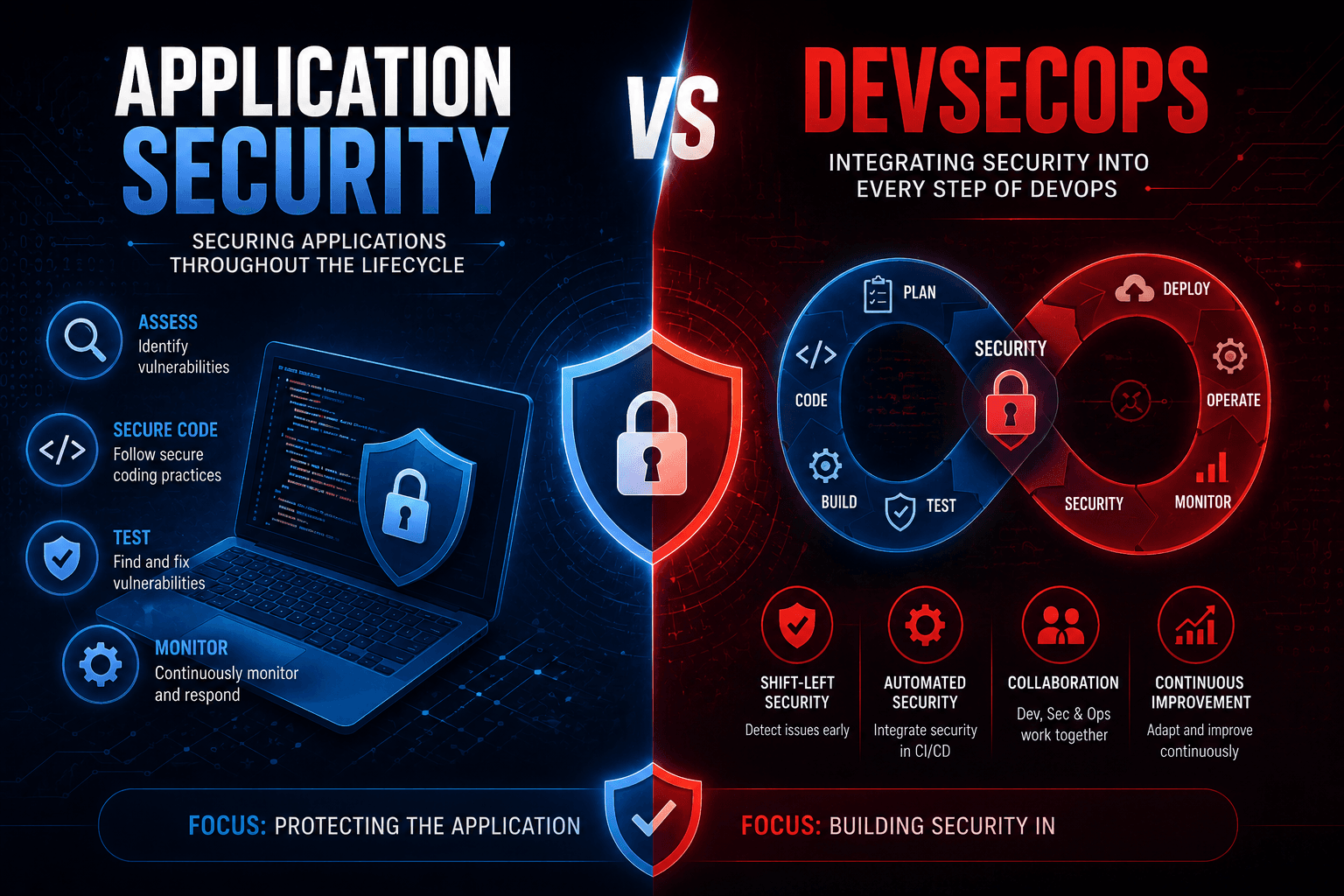
Modern software moves fast. Teams ship code daily, deploy to cloud, and rely on APIs, containers, and third-party services. Security has to move just as fast. Two terms you will hear often are application security and DevSecOps. They sound similar and overlap in some areas, but they are not the same thing. Application security focuses on the security of the software itself. DevSecOps focuses on how security is built into the entire delivery pipeline. Understanding the difference helps you build a stronger, faster, and more secure development program.
What is Application Security?
Application security is the practice of finding, fixing, and preventing security issues in software. It covers web apps, APIs, mobile apps, microservices, and the underlying frameworks. AppSec uses tools like SAST, DAST, SCA, and IAST, plus manual code review and penetration testing. The goal is simple: make sure each application is safe to use, processes data correctly, and resists attacks. AppSec teams work closely with developers and architects to harden software, manage vulnerabilities, and reduce business risk over time.
What is DevSecOps?
DevSecOps is a culture and engineering practice that integrates security into every stage of the software delivery lifecycle. It builds on DevOps by adding security checks into planning, coding, building, testing, deploying, and operating. DevSecOps relies heavily on automation, shared responsibility, and fast feedback loops. Instead of treating security as a final gate, it spreads security tasks across developers, operations, and security teams. The result is faster releases with fewer surprises and less last-minute work to fix critical issues at the worst possible time.
Also Read: Application Control 101
Key Differences Between Application Security and DevSecOps
1. Core Focus
Application security focuses on the security quality of the software itself, including code, design, libraries, and runtime behavior. It looks at how the application processes data, handles users, and resists attacks. DevSecOps focuses on the entire delivery pipeline and the way security is embedded into development and operations. It covers people, processes, automation, and tools across the full lifecycle, not just the technical security of one application at a time.
2. Scope
Application security has a narrower scope and centers on individual applications, APIs, and components. It is concerned with vulnerabilities, threat models, and code-level controls in specific systems. DevSecOps has a broader scope and includes infrastructure as code, CI/CD pipelines, container security, cloud configuration, and runtime monitoring. It treats the whole environment as one system, where weak links anywhere can compromise everything, not just an individual application or microservice in isolation.
3. Goals and Objectives
The main goal of application security is to reduce the number and impact of vulnerabilities in software. AppSec teams measure success in terms of issue counts, severity, time to fix, and risk reduction. DevSecOps has broader goals like faster delivery without sacrificing security, shared accountability across teams, and earlier detection of issues. Success in DevSecOps is measured in build failure rates, mean time to detect, deployment frequency, and how well security is woven into daily engineering work.
Helpful for you: What is API Hacking and How to Prevent It?
4. Tools Used
Application security relies on tools such as SAST, DAST, IAST, SCA, RASP, and dedicated vulnerability management platforms. Penetration testing and threat modeling are also key parts of AppSec. DevSecOps uses many of these tools but also adds CI/CD security plugins, container image scanners, infrastructure-as-code analyzers, secret scanners, policy-as-code engines, and cloud posture management. The tooling stack in DevSecOps is wider because it needs to cover code, pipelines, infrastructure, and runtime together.
5. Where Security Fits in the Lifecycle
In traditional application security, security checks often happen later in the lifecycle, sometimes only at the testing or release stage. This can lead to costly late fixes. DevSecOps shifts security left and right at the same time. Issues are caught early in design, code, and build, but also monitored continuously after deployment. Security is no longer a checkpoint at the end. It becomes a constant set of checks and feedback loops across every stage of the lifecycle.
Must Read: DAST vs Penetration Testing
6. Team Responsibility
Application security usually sits with a dedicated security team. This team reviews code, manages tools, runs pentests, and tracks vulnerabilities. They guide developers but often own the security tools and reporting. DevSecOps spreads responsibility across developers, operations, and security. Developers run security tests in their pipelines. Operations enforces secure configurations and monitoring. Security teams shift to coaching, building guardrails, and handling complex threats. The model is collaborative instead of one team being solely responsible for everything.
7. Automation Level
Application security uses automation in tools like SAST and DAST, but many activities such as threat modeling, design reviews, and pentests stay manual. DevSecOps is built around automation. Security tests run automatically in pipelines, policies are enforced as code, and alerts trigger automated responses where possible. The level of automation in DevSecOps is higher because the pace of modern software delivery does not allow manual checks at every step without slowing teams down significantly.
You May Also Like: Top Vulnerability Management Tools
8. Speed and Agility
Application security can feel slow when it is treated as a separate phase. Long review cycles and late-stage testing often block releases. DevSecOps is designed for speed and agility. By embedding security into pipelines and using lightweight, automated checks, teams can ship features quickly while keeping security strong. AppSec activities still happen, but they are scheduled and scoped so they support, not delay, fast delivery cycles that modern businesses depend on.
9. Risk Coverage
Application security focuses on risks at the software level, such as injection, authentication flaws, business logic issues, and library vulnerabilities. It is sharp and deep on the application itself. DevSecOps covers risks across the whole pipeline, including supply chain attacks, leaked secrets, misconfigured cloud, weak access controls in CI/CD, and runtime threats. Together, they cover both narrow application risks and broader systemic risks that arise from how software is built and deployed in modern environments.
10. Maturity and Culture
Application security can exist in companies with traditional waterfall or slow release cycles. It works as a specialist function that improves software security over time. DevSecOps requires a stronger culture shift, where developers, operations, and security work together with shared goals and shared metrics. It demands engineering maturity, automation, and trust between teams. AppSec is a function. DevSecOps is more like an operating model that touches every team, every pipeline, and every environment.
Also Read: Penetration Testing vs Vulnerability Assessment
Application Security vs DevSecOps: At a Glance
| Feature | Application Security | DevSecOps |
|---|---|---|
| Focus | Security of software | Security across delivery |
| Scope | Apps and APIs | Code, pipeline, infra, runtime |
| Ownership | Security team | Dev, ops, and security together |
| Tools | SAST, DAST, SCA, IAST | AppSec tools plus pipeline, IaC, cloud |
| Lifecycle | Often late stage | Across all stages |
| Automation | Partial | High |
| Speed | Can slow releases | Built for speed |
| Risk Coverage | Application risks | Application plus systemic risks |
| Culture | Specialist function | Shared, cross-team model |
| Best For | Securing individual apps | Modern, fast-moving teams |
Pros and Cons of Application Security
Pros of Application Security
- Deep focus on software-specific risks and vulnerabilities.
- Strong fit for compliance and regulated environments.
- Brings expert-led review through code analysis and pentesting.
- Helps developers build secure design and coding habits.
Cons of Application Security
- Can feel slow when treated as a separate phase.
- May become a bottleneck if security stays siloed.
- Often focused on issues after the code is written.
- Limited view of pipeline, cloud, and runtime risks.
Pros and Cons of DevSecOps
Pros of DevSecOps
- Embeds security into every stage of delivery.
- Speeds up detection and fixing of issues.
- Spreads ownership across developers, ops, and security.
- Improves cloud, pipeline, and runtime security together.
Cons of DevSecOps
- Requires cultural change and strong engineering maturity.
- Tooling and automation setup can be complex initially.
- Risk of alert fatigue if not tuned properly.
- Still needs deep AppSec expertise for complex issues.
Helpful for you: Web Application Security Issues and Their Solutions
How to Choose the Right Approach for Your Business
- Treat application security and DevSecOps as complementary, not competing strategies.
- Start with strong AppSec basics like secure coding, SAST, DAST, and pentesting.
- Layer DevSecOps practices once your delivery pipelines and culture are ready.
- Measure success with both vulnerability metrics and pipeline-level security metrics.
- Invest in training so developers understand both secure coding and DevSecOps tooling.
How Orasec Can Help You?
Orasec strengthens both your application security and DevSecOps efforts. Our Web Application Security Testing combines manual penetration testing with deep technical analysis to find issues that automated tools and pipeline scanners miss. We help you align AppSec findings with your DevSecOps workflows, so issues are tracked, fixed, and verified inside your existing tools. With Orasec, you get expert offensive security insight without slowing down your engineering teams or breaking your delivery culture.
Conclusion
Application security and DevSecOps are deeply connected, but they are not the same. AppSec focuses on making each application safer. DevSecOps focuses on making the entire delivery model safer and faster. Mature security programs use both. They invest in strong AppSec foundations like testing, code review, and pentesting, and they wrap that work inside a DevSecOps culture that automates checks, shares responsibility, and reacts quickly to new threats. Done well, this combination gives you secure software at the speed modern business demands.
FAQs
Is DevSecOps just application security with extra steps?
No. DevSecOps is broader than application security. It covers people, processes, pipelines, infrastructure, and runtime, while AppSec focuses mainly on the security of software code and its components.
Do I need application security if I already do DevSecOps?
Yes. DevSecOps integrates security into delivery, but you still need deep application security work like manual code review, pentesting, and threat modeling to find issues that automated pipeline checks cannot catch.
Which is better for compliance, AppSec or DevSecOps?
Both support compliance. AppSec is closer to specific control requirements around code and applications. DevSecOps helps demonstrate continuous controls, audit trails, and shared responsibility across teams, which auditors increasingly expect from mature organizations.
Can small teams adopt DevSecOps?
Yes. Small teams can adopt DevSecOps step by step. Start with basic automation, secret scanning, and dependency checks in CI/CD. Then gradually add more advanced practices like policy-as-code, container security, and runtime monitoring as the team grows.
How does penetration testing fit into AppSec and DevSecOps?
Penetration testing sits at the heart of application security but also strengthens DevSecOps. It validates that pipeline checks, code reviews, and runtime controls actually work by simulating real attacks against the systems your team builds and operates.