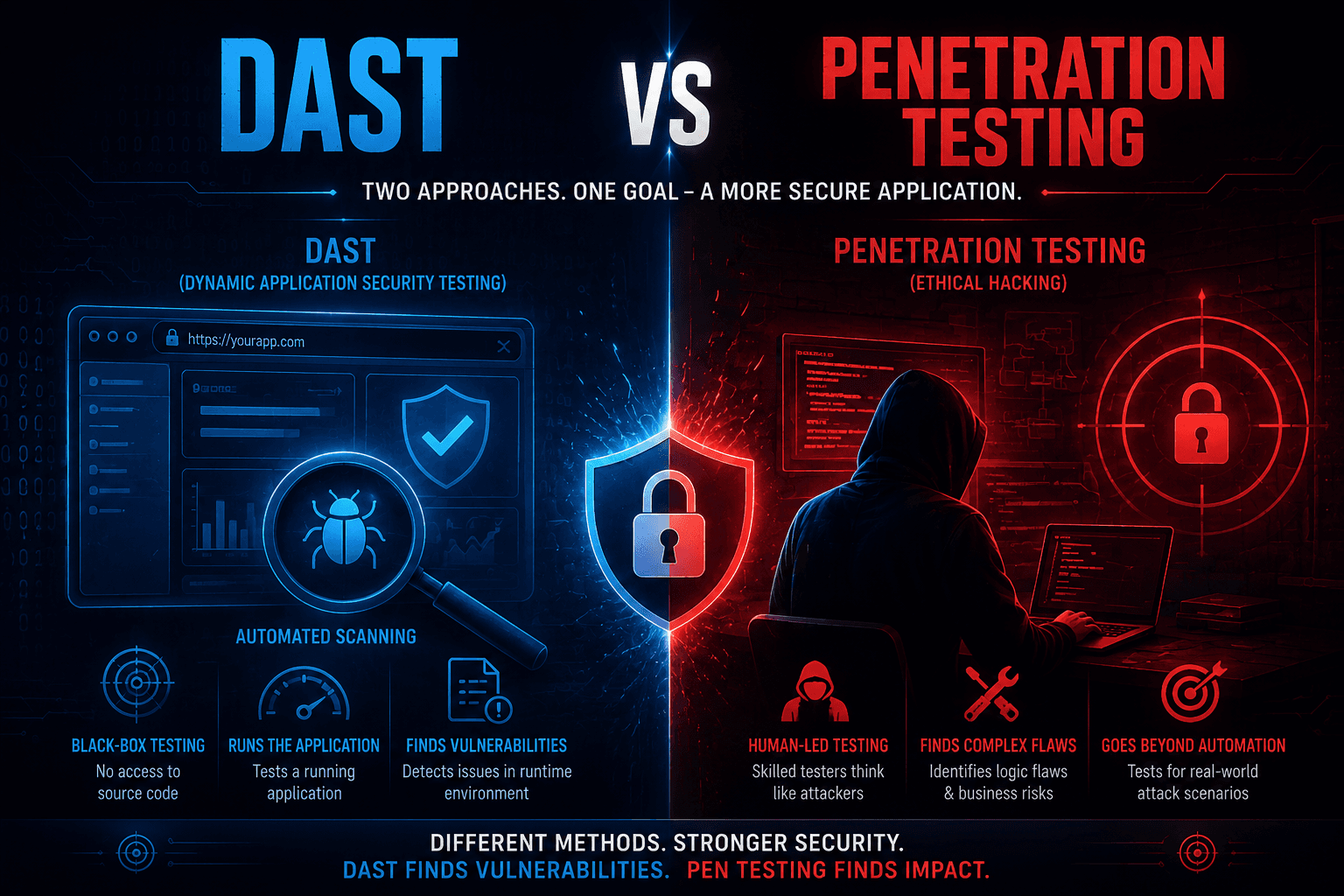
Modern businesses depend on web apps, APIs, and cloud services. Each of them is a possible entry point for attackers. To stay safe, companies use different types of security testing. Two of the most common are Dynamic Application Security Testing (DAST) and penetration testing. They often get confused, but they solve different problems. DAST gives fast, automated visibility into known issues. Penetration testing brings human attackers into the picture to validate real risk. Understanding how they compare helps you build a smarter security program and choose the right approach for your business.
What is DAST?
DAST stands for Dynamic Application Security Testing. It is an automated approach that tests running web applications and APIs from the outside, the same way an attacker would. DAST tools send crafted requests to your app and analyze responses to find issues like SQL injection, XSS, broken authentication, and security misconfigurations. It does not need access to source code. DAST is great for continuous testing inside CI/CD pipelines because it can run often, scale across many apps, and quickly flag known vulnerability patterns.
What is Penetration Testing?
Penetration testing is a manual, human-driven security assessment performed by skilled ethical hackers. Testers behave like real attackers. They explore your applications, networks, and APIs to find weaknesses, chain them together, and prove real business impact. Penetration testing covers technical issues like authentication bypasses and infrastructure flaws, but also business logic errors that no scanner can understand. It produces detailed reports with attack paths, evidence, and clear remediation steps that help teams fix high-impact issues, not just generic findings from a tool.
Key Differences Between DAST and Penetration Testing
1. Core Approach
DAST is an automated, tool-driven approach that scans running applications using predefined attack patterns. It runs the same checks every time and is highly repeatable. Penetration testing is a manual, creative approach where human experts use a mix of tools, scripts, and original techniques to find issues. The tester adapts to the application instead of following a fixed checklist, which means penetration testing uncovers risks that simple automated scans cannot see in modern, complex applications.
2. Depth of Testing
DAST works mostly at the surface level and finds known vulnerability patterns based on signatures and rules. It catches many common issues quickly but rarely understands how features interact. Penetration testing goes much deeper. Testers chain vulnerabilities, abuse logic flaws, and combine different findings to show real attack paths. This depth is critical for high-value systems where a single chain of small issues can lead to a major breach or full account takeover.
3. Coverage of Business Logic
DAST tools have very limited understanding of business logic. They check inputs, outputs, and known patterns, but they cannot reason about discount rules, payment flows, role permissions, or feature design. Penetration testers actively look for business logic flaws because that is where the most damaging issues hide. They test workflows like checkout, refunds, role changes, and approvals to find ways attackers can abuse the system in ways that scanners never detect.
Also Read: PTaaS vs Traditional Pentesting
4. False Positives and Manual Validation
DAST scanners often produce false positives. Teams spend significant time triaging findings to separate real issues from noise. This can slow down development if not managed well. Penetration testing reports include only validated findings because each issue is manually verified, often with proof-of-concept exploits or screenshots. The result is a smaller list of high-quality issues that developers can trust and act on without having to first confirm whether each finding is real.
5. Speed and Frequency
DAST is fast and can be scheduled to run nightly, weekly, or as part of every build. It gives quick feedback to development teams and helps catch new issues early. Penetration testing is slower and usually scheduled less often, such as quarterly, after major releases, or before launches. Speed favors DAST, but the depth of penetration testing makes it ideal for periodic deep dives that complement the day-to-day automated checks running in your pipeline.
6. Cost and Resources
DAST has a fixed cost based on tool licenses, infrastructure, and engineering time to maintain scans. Once set up, it can run continuously across many applications. Penetration testing is more expensive per engagement because it requires highly skilled professionals and detailed manual work. However, the value comes from finding business-critical issues that automated tools simply cannot. Most mature security programs use both DAST for ongoing coverage and penetration testing for periodic high-impact assessments.
Helpful for you: Penetration Testing vs Vulnerability Assessment
7. Skill Requirements
DAST mostly needs engineers who can configure scanners, integrate them into pipelines, and interpret results. It does not require advanced offensive security expertise. Penetration testing requires deep knowledge of attacker techniques, modern application architectures, cloud, APIs, and identity. Testers need to think creatively, understand business context, and stay updated on new attack methods. The level of skill and experience involved is a major reason penetration testing finds risks that automated tools miss.
Also Read: Top Vulnerability Management Tools
8. Reporting and Insights
DAST produces tool-generated reports with lists of findings, severity scores, and basic remediation hints. These reports are useful but often lack business context. Penetration testing delivers detailed reports tailored to your environment, with attack narratives, screenshots, replay steps, and clear remediation guidance. The report explains not just what is broken, but why it matters, who could exploit it, and how it links to real business risk, which is more useful for leadership and engineering teams.
9. Compliance Use Cases
DAST helps you meet some compliance requirements around continuous testing and secure development, especially for frameworks like ISO 27001, SOC 2, and PCI DSS. Penetration testing is often a hard requirement in many compliance standards and contracts. PCI DSS, HIPAA, and many enterprise vendor assessments explicitly require manual penetration tests by qualified professionals. For full coverage, most regulated businesses run both DAST and penetration testing on a regular schedule and document everything carefully.
Must Read: How to Choose the Right Penetration Testing Provider
10. Best Use Cases
DAST is best for continuous monitoring of many applications, early detection of common issues, and feedback loops with developers in CI/CD. It is also useful for catching regressions after each release. Penetration testing is best for high-risk systems, sensitive data flows, major releases, mergers and acquisitions due diligence, and compliance audits. The two methods are complementary. DAST provides constant pressure on known issues, while penetration testing provides deep insight into real-world risk.
DAST vs Penetration Testing: At a Glance
| Feature | DAST | Penetration Testing |
|---|---|---|
| Approach | Automated scanning | Manual expert testing |
| Depth | Surface to medium | Deep and contextual |
| Business Logic | Very limited | Strong focus |
| False Positives | Common | Rare, validated |
| Frequency | Continuous | Periodic |
| Cost | Lower per run | Higher per engagement |
| Skills | Engineering and DevOps | Offensive security experts |
| Output | Tool-generated reports | Detailed narrative reports |
| Compliance | Supportive | Often required |
| Best For | CI/CD and broad coverage | High-risk and critical apps |
Pros and Cons of DAST
Pros of DAST
- Fast and easy to integrate into CI/CD pipelines.
- Scales across many applications without extra human effort.
- Finds common issues like injection and misconfigurations quickly.
- Provides repeatable, consistent baseline testing over time.
Cons of DAST
- Limited understanding of business logic and complex workflows.
- Produces false positives that require triage.
- Cannot fully simulate creative, real-world attackers.
- Often misses chained vulnerabilities and identity-related issues.
Pros and Cons of Penetration Testing
Pros of Penetration Testing
- Finds business logic flaws and complex multi-step attacks.
- Validates real exploitability with clear proof and impact.
- Provides detailed, prioritized remediation guidance.
- Required by many compliance standards and enterprise contracts.
Cons of Penetration Testing
- Higher cost compared to automated testing.
- Slower process that cannot run continuously like DAST.
- Depends heavily on the skill of the testing team.
- Limited coverage when scoped too narrowly or rushed.
How to Choose the Right Approach for Your Business
- Use DAST for continuous, automated testing across all your applications and APIs.
- Use penetration testing for high-value systems, regulated data, and pre-launch reviews.
- Combine both methods so DAST catches common issues fast and pentests find deeper risks.
- Match testing intensity to business risk, not just compliance checkboxes.
- Make sure findings from both approaches feed into the same remediation workflow.
How Orasec Can Help You?
Orasec delivers expert-led Web Application Security Testing that goes far beyond automated scanning. Our team uses DAST tools as a starting point, then layers manual penetration testing to uncover business logic, authentication, and access control flaws that scanners miss. You get a clear, prioritized report with real-world attack paths and remediation steps your developers can act on. With Orasec, you combine the speed of DAST with the depth of human-driven testing for stronger protection.
Conclusion
DAST and penetration testing are not competing options. They are two parts of a strong application security program. DAST gives you fast, automated coverage across many apps. Penetration testing gives you deep, human-driven insight into the issues that really matter. Used together, they help you find more risks, fix them faster, and prove security to customers, auditors, and partners. The best businesses use both, scale them based on risk, and treat application security as a continuous practice, not a one-time task.
FAQs
Is DAST the same as penetration testing?
No. DAST is automated scanning of running applications using predefined patterns. Penetration testing is a manual, expert-driven exercise that mimics real attackers, including business logic abuse and chained vulnerabilities.
Can DAST replace penetration testing?
DAST cannot fully replace penetration testing. It is great for continuous, broad coverage but misses business logic flaws and complex attack paths. Most businesses use DAST and penetration testing together for layered protection.
How often should I run DAST and penetration testing?
Run DAST continuously or with every build to catch regressions quickly. Run penetration testing at least annually, plus before major releases, after architecture changes, and when compliance frameworks require formal testing.
Which is more useful for compliance, DAST or penetration testing?
Both support compliance, but penetration testing is often explicitly required by standards like PCI DSS, HIPAA, and many enterprise vendor assessments. DAST supports continuous testing requirements and secure development lifecycle controls.
Do I need DAST if I already do penetration testing?
Yes. Penetration testing is periodic, while DAST runs continuously. Without DAST, new vulnerabilities introduced between tests can stay open for months. Together, they give you both depth and ongoing visibility into application risk.