In today’s data-driven business environment, organizations handle massive volumes of structured and unstructured documents daily. Therefore, manual processing becomes inefficient, slow, and error-prone. IDR automation (Intelligent Document Recognition/Processing) addresses this challenge by enabling smart data extraction and classification. Moreover, it improves accuracy, speed, and operational efficiency across workflows. Consequently, businesses achieve faster decision-making and reduced operational costs. This article provides a complete technical overview of IDR automation and its benefits.
What is IDR Automation
IDR automation is a technology that intelligently captures, classifies, and extracts data from various document types. It uses artificial intelligence, machine learning, and optical character recognition to process information. Moreover, it converts unstructured documents into structured, usable data formats. Therefore, organizations can reduce manual intervention significantly. Additionally, it ensures higher accuracy and consistency in data processing. As a result, businesses improve productivity and streamline document-heavy operations.
Also Read: The Future of Red Teaming
How IDR Automation Works

1. Document Capture
IDR automation begins by capturing documents from multiple sources such as emails, scanners, APIs, or uploads. Furthermore, it centralizes all incoming data into a unified system for processing. Therefore, it eliminates scattered document handling. As a result, organizations gain better visibility and control over data flow.
2. Classification Process
Next, the system automatically classifies documents based on type, format, or content structure. Moreover, machine learning models improve classification accuracy over time. Consequently, documents are routed to the correct processing workflow. Therefore, operational efficiency increases significantly.
3. Data Extraction
After classification, IDR extracts relevant data using OCR and AI-based recognition techniques. Additionally, it identifies key fields such as names, dates, and financial values. Therefore, unstructured content becomes structured and usable. As a result, data processing becomes faster and more reliable.
4. Validation and Integration
Finally, extracted data is validated against predefined rules or external databases. Moreover, it is integrated into enterprise systems such as ERP or CRM platforms. Therefore, organizations ensure data accuracy and consistency. Consequently, business processes become fully automated and efficient.
Also Read: Red Team vs Blue Team vs Purple Team
Key Features of IDR Automation
IDR automation provides advanced intelligent capabilities that streamline document-heavy workflows across enterprises. Moreover, it reduces manual processing effort while improving accuracy and operational speed. Therefore, it plays a central role in modern automation strategies and digital transformation initiatives.
- AI-powered document classification for automatic sorting of files
- Advanced OCR (Optical Character Recognition) for extracting text from scanned documents
- Machine learning-based data extraction for continuous accuracy improvement
- Multi-format support including PDFs, images, emails, and forms
- Intelligent field detection for key data such as names, dates, and amounts
- Real-time data validation against predefined business rules
- Automated workflow routing to relevant departments or systems
- Seamless integration with ERP, CRM, and enterprise applications
- Exception handling for incomplete or low-quality documents
- Audit trails for compliance, tracking, and regulatory reporting
- Scalable architecture for high-volume document processing
- Cloud and on-premise deployment flexibility for business needs
- Self-learning models that improve accuracy over time
- Data encryption and security for sensitive information protection
- Analytics dashboard for monitoring performance and insights
Key Benefits of IDR Automation

1. Faster Processing Speed
IDR automation significantly reduces document processing time by eliminating manual handling delays. Moreover, it enables instant data capture and extraction across multiple document formats. Therefore, organizations can process large volumes of documents quickly and efficiently. As a result, overall operational workflows become faster and more streamlined.
2. Improved Accuracy
IDR automation minimizes human errors in data extraction and entry through AI-driven recognition. Additionally, machine learning models improve accuracy over time with continuous usage. Therefore, organizations achieve consistent and reliable data outputs. As a result, data quality and integrity improve significantly.
3. Cost Reduction
Organizations reduce labor costs associated with manual document processing and data entry tasks. Moreover, automation decreases operational overhead and resource dependency. Therefore, businesses optimize expenses while maintaining efficiency. As a result, long-term cost savings increase substantially.
Must Read: How to Prepare Your Organization for a Pentest
4. Enhanced Productivity
Employees can focus on strategic and high-value tasks instead of repetitive document handling. Moreover, automated workflows reduce time spent on manual operations. Therefore, teams achieve more output in less time. Consequently, overall productivity improves across departments.
5. Better Compliance
IDR automation ensures adherence to regulatory standards by maintaining accurate and consistent records. Moreover, it provides audit trails and documentation tracking capabilities. Therefore, organizations can meet compliance requirements more effectively. As a result, risks related to audits and penalties are reduced.
6. Scalability
IDR systems can handle increasing document volumes without impacting performance or efficiency. Moreover, they scale easily with business growth and operational demands. Therefore, organizations can expand without worrying about processing limitations. As a result, scalability becomes seamless and efficient.
7. Real-Time Data Access
Processed data becomes available instantly after extraction and validation. Moreover, real-time access enables faster analysis and reporting. Therefore, decision-makers can act quickly based on accurate information. As a result, business agility and responsiveness improve significantly.
You May Also Like: How Prompt Injection Attacks Bypassing AI Agents With Users Input
8. Reduced Operational Risk
Automation reduces reliance on manual processes, which are prone to inconsistencies and errors. Moreover, it standardizes document handling and processing workflows. Therefore, risks related to data inaccuracies and delays decrease. As a result, organizations achieve more stable and reliable operations.
9. Workflow Automation
IDR integrates seamlessly into existing business systems and workflows. Moreover, it automates repetitive document-related tasks across departments. Therefore, processes become more efficient and less time-consuming. Consequently, organizations improve operational efficiency and consistency.
10. Business Intelligence Enablement
Structured data generated through IDR supports advanced analytics and reporting. Moreover, it provides accurate insights for strategic decision-making. Therefore, organizations gain better visibility into business operations. As a result, data-driven decisions become more effective and impactful.
IDR Application Across Different Domains
IDR automation is widely used across industries to handle large-scale document processing efficiently. Moreover, it improves accuracy, reduces delays, and enhances decision-making. Therefore, it has become essential in digital-first business environments.
- Banking for loan processing and credit applications
- Banking for KYC (Know Your Customer) verification
- Insurance for claims processing and documentation
- Insurance for fraud detection and policy validation
- Healthcare for patient record digitization
- Healthcare for medical billing and insurance claims
- Logistics for shipment tracking and delivery documentation
- Logistics for invoice and supply chain processing
- Legal sector for contract review and case documentation
- Legal sector for compliance and evidence management
- Retail for invoice and purchase order processing
- E-commerce for order validation and returns handling
- Government for citizen records and form processing
- Tax departments for automated tax filing and audits
- Human resources for resume screening and employee records
- Manufacturing for procurement and supply chain documents
- Education for admissions and student record management
- Telecom for customer onboarding and billing documents
- Real estate for property agreements and documentation
- Energy and utilities for billing and customer data processing
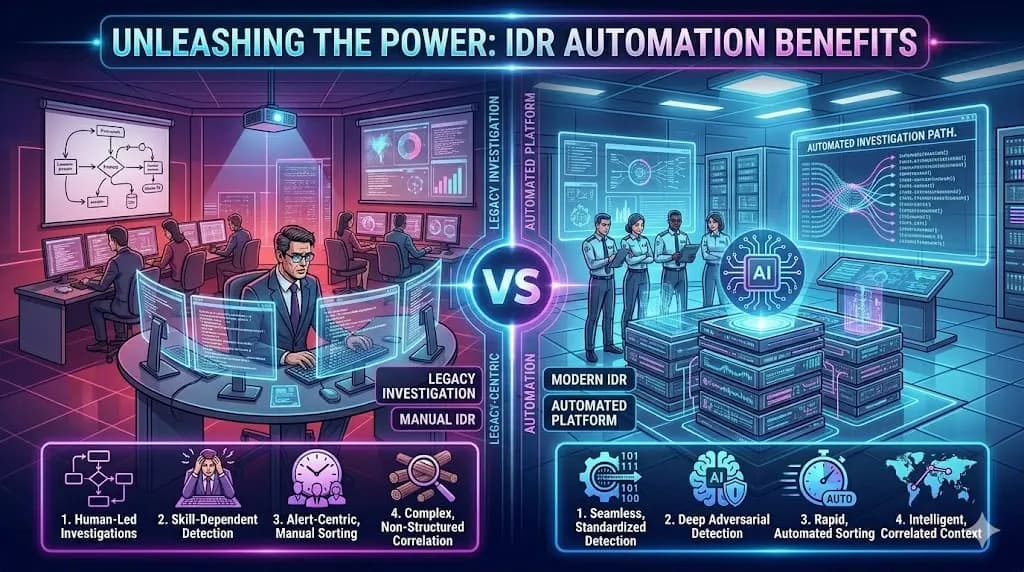
IDR Automation vs Manual Document Recognition
Conclusion
IDR automation delivers a powerful solution for managing complex document workflows efficiently. Moreover, it reduces manual effort while improving accuracy and speed. Additionally, it supports multiple industries and integrates seamlessly into enterprise systems. Therefore, organizations achieve better productivity and operational control. Ultimately, adopting IDR automation strengthens digital transformation and long-term business growth.
FAQs
What does IDR automation mean?
IDR automation refers to Intelligent Document Recognition/Processing that extracts and processes data from documents automatically.
How does IDR improve efficiency?
It reduces manual work, speeds up processing, and improves data accuracy through AI-based automation.
Is IDR suitable for small businesses?
Yes, it scales easily and benefits both small and large organizations.
What technologies does IDR use?
It uses OCR, artificial intelligence, and machine learning for document processing.
Why is IDR important in modern businesses?
It enhances productivity, reduces costs, and supports digital transformation initiatives.