Security budgets follow production. That's where the customers are, the money moves, and the board looks.
Attackers work the other way round. They look for the softest way in. That may be a dev box, a staging server, or a QA database someone stood up in a hurry and never locked down.
What Counts as a Non-Production Environment?
Anything you build and test on rather than serve customers from. Dev, test, QA, staging, sandboxes, and the one-off box someone spun up for a client pitch two years ago.
They exist so teams can move fast without breaking live systems. Good reason. Trouble starts when speed is the only priority.
Why Attackers Target Them
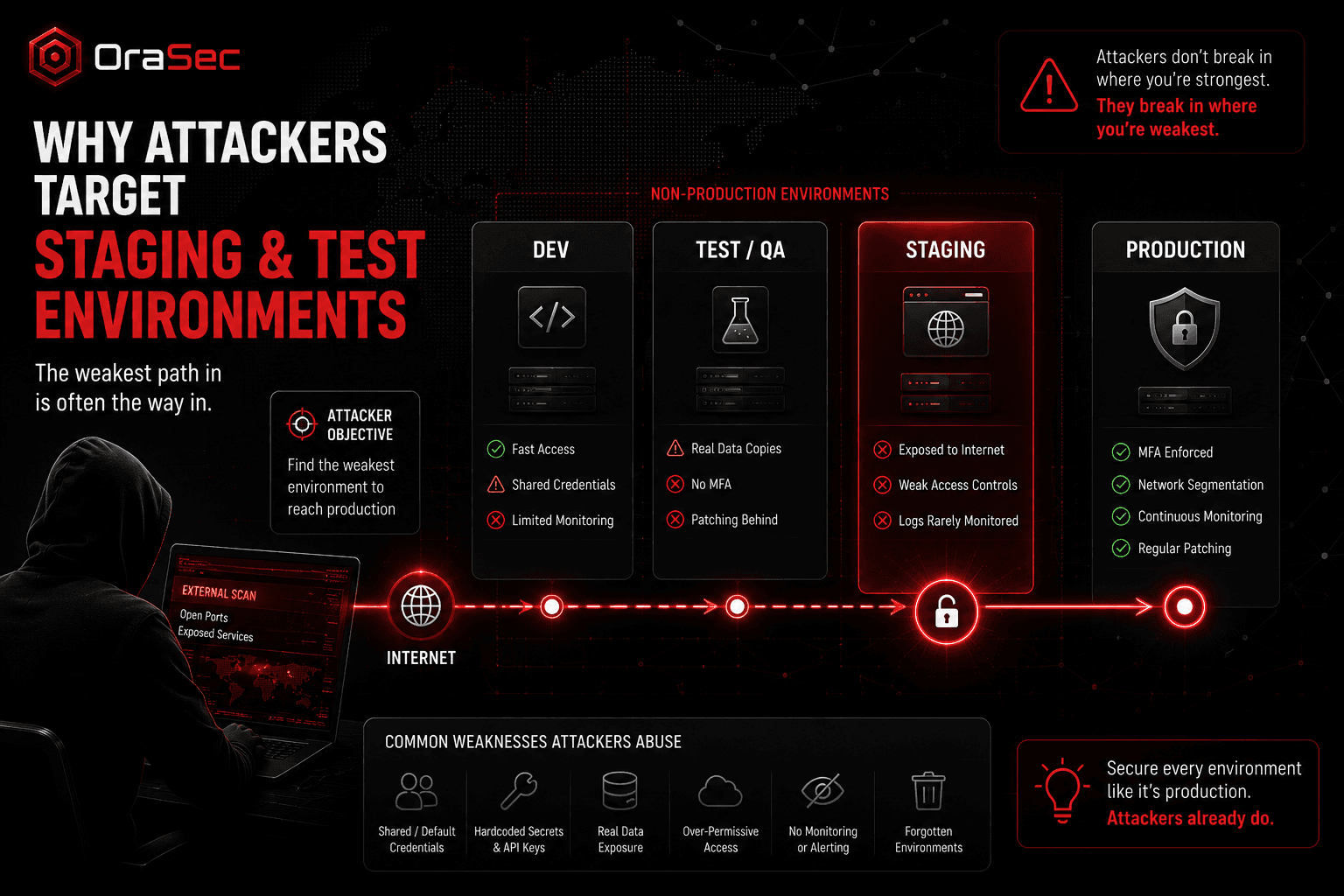
Security controls are looser. Shared logins, no MFA, open network access, patching months behind. The reasoning is always the same: it's only a test system.
They often hold real data. Copying a production database to test against is quick and it works. Now customer records sit somewhere with none of production's protection. Debug logs and support exports do the same quietly.
They often receive less monitoring than production. Production has alerts, log retention, and a SOC. Staging frequently has less of each. An attacker who lands there may remain undetected for longer if logging and monitoring are weak.
They get forgotten. Teams spin systems up fast and tear them down slowly, or never. Old test servers, leftover cloud resources, staging sites nobody owns. Attackers scan for these.
Credentials are reused. Hardcoded secrets in configs, API keys with production permissions, service accounts shared across environments. That last one turns a minor foothold into a real problem.
How the Attack Chain Works
The path is usually short:
- Find an exposed dev or staging system, often through a simple internet scan
- Get in using weak, default, or reused credentials
- Pull secrets from configs, environment variables, or source
- Use those credentials against production
- Escalate and move sideways from there
Nobody attacked production directly. They walked in from the side, holding keys that should never have left the test environment.
That's why these incidents look confusing early on. The entry point isn't where anyone looked.
What Regulators Say About This
Spain's data protection authority puts it bluntly. Major breaches, it says, "do not occur in the most important systems of an organisation, but in secondary systems."
The European Data Protection Supervisor is just as direct on test data. Sampling real personal data "should be avoided," because it wasn't collected for testing. If you truly need it, document why and keep the set small.
GDPR Article 32 applies to personal data processing regardless of whether it happens in production or staging. The controls must be appropriate to the risk.
Why These Breaches Stay Hidden
Ownership is the usual culprit. Nobody is sure whose system it is, so nobody patches it or asks why it's online.
The asset never made the inventory. Logs go unread. Security may not know it exists. The compromise surfaces later, when data turns up where it shouldn't.
Assumptions That Cause Trouble
Four beliefs show up repeatedly:
- It's not production, so it doesn't matter
- We'll lock it down later
- Only internal people know it's there
- There's nothing sensitive on it
The third is worth dwelling on. Internet-wide scanning is cheap and constant. Obscurity buys nothing.
How to Reduce the Risk
None of this needs new tooling. It needs an owner.
- Keep an inventory of every environment, temporary ones included
- Apply production-grade authentication, especially MFA
- Use synthetic or masked test data by default
- Give each environment its own credentials, scoped tight and rotated
- Keep non-production off the public internet where possible, or protect it with authenticated access such as VPN or zero-trust
- Set an expiry date on temporary environments and enforce it
- Send the logs somewhere they get read
Visibility comes first. You can't defend what nobody remembers building.
What Should Security Testing Cover?
Many penetration tests focus on the assets defined in scope, and non-production is often excluded unless it is explicitly included. Attackers ignore that boundary, so ask your testers to include:
- Discovery of forgotten assets across your domains and cloud accounts
- Staging and QA systems reachable from the internet
- Whether non-production credentials work against production
- Whether test databases hold real customer data
- How far access from a compromised dev box reaches
If your scope stops at production, your risk picture has a hole.
How OraSec Can Help
OraSec maps your full external footprint before testing anything, which routinely surfaces environments clients had forgotten. We then check what those systems expose and whether their credentials reach production. You get the real attack path, not a test limited to assets you knew about.
Conclusion
Attackers don't start where you're strongest. They start where you're weakest, and non-production often is.
Bring test and staging into scope. Inventory them, lock the credentials down, keep customer data out, and test them like they matter. To an attacker, they already do.
FAQs
Should staging have the same controls as production? For access, authentication, and data handling, yes. Relax availability and performance, not security.
Is real customer data ever acceptable in testing? Only with a documented reason and the smallest possible dataset. Regulators expect masked or synthetic data by default.
How do we find forgotten environments? External attack surface discovery across your domains, certificates, and cloud accounts. Most teams find something unexpected.
Do attackers really scan for these? Internet-wide scanning is cheap and continuous. An exposed staging login is an obvious target.
Does a standard pentest cover non-production? Only if those environments are included in the agreed scope. Check before you sign.