Self-managed MongoDB binds to localhost by default, so a default mongod instance is not directly reachable from other hosts. Exposure usually appears when administrators widen bindIp, publish the database through a container, or open network rules. (MongoDB)
At Orasec, we regularly find exposed or weakly protected MongoDB instances.
What Is MongoDB?
MongoDB is a NoSQL database. Instead of tables and rows, it stores documents in a JSON-like format, so data structures can change without a schema rewrite. It runs behind web applications, APIs, and mobile backends, self-hosted or managed through Atlas.
How Does MongoDB Access Control Work?
Two things decide whether a database is safe: network reachability and authentication.
Authentication. On self-managed MongoDB, access control is disabled by default and must be enabled explicitly. MongoDB Atlas is different: Atlas requires database authentication and does not allow access control to be disabled. (MongoDB)
When access control is enabled but no users or roles exist, MongoDB's localhost exception allows limited administrative actions needed to create the first user or role and initialize a replica set. It does not provide unrestricted database access. (MongoDB)
The highest-risk combination is a MongoDB instance reachable from untrusted networks with access control disabled or otherwise ineffective. Network restrictions and authentication should both be enforced.
Why Does It Matter?
Internet-exposed MongoDB services are routinely discoverable through scanning and internet-search platforms. Treat an unrestricted public instance as exposed rather than relying on obscurity. Recent research found thousands of MongoDB databases reachable without proper restrictions. (SecurityWeek)
Depending on the application, MongoDB may contain user profiles, API credentials, transaction data, application logs, or personal information. Exposure can therefore become a serious data-breach issue.
Where Do Breaches Actually Come From?
No authentication. No access control on an internet-reachable self-managed instance can allow unauthenticated clients to access and modify database contents, depending on the deployment.
Weak or reused credentials. Shared admin accounts and recycled passwords turn a leaked credential into database access.
Over-privileged roles. One root user for the application, the analytics job, and the migration script makes any compromise total.
Backups and test databases. Snapshots in public cloud buckets, staging copies with real customer records, and old instances nobody shut down.
NoSQL injection. This does not need the database exposed. NoSQL operator injection can occur when an application accepts structured user-controlled input and inserts it into a MongoDB query without validating its expected type or allowed operators. For example, an unexpected $ne condition can change query logic in vulnerable application code.
Server-side JavaScript such as $where creates additional risk when untrusted input can influence the expression. MongoDB 8.0 now deprecates $where, $function, and $accumulator; disable server-side JavaScript if your application does not need it. (MongoDB)
How Do Attackers Exploit It?
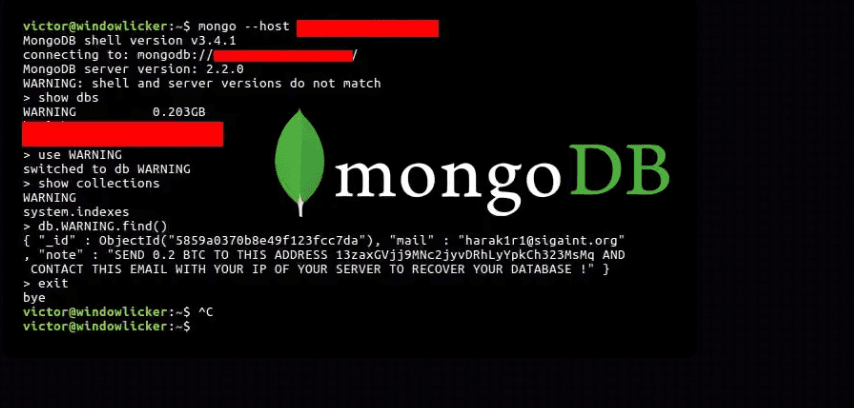
Attackers have historically wiped exposed databases and left ransom notes. In some campaigns attackers claimed to have stolen data even when researchers found no evidence that the data had actually been copied. (SecurityWeek)
Automated campaigns have repeatedly wiped exposed MongoDB databases at scale. Similar activity was still being observed in 2026, when researchers identified more than 1,400 compromised unrestricted instances. (SecurityWeek)
Common Mistakes
- Assuming a private subnet is private. Peering, VPNs, and misapplied security groups make it reachable.
- Relying only on basic logging. This can limit investigation depth. MongoDB logs can record authentication attempts and source IPs, while MongoDB Enterprise and Atlas provide auditing capabilities for more detailed user and database activity. (MongoDB)
How to Reduce the Risk
- Use role-based access with least privilege, not a shared root account
- Enable TLS for connections and protect data at rest using MongoDB's supported encryption options or appropriate host/storage encryption. This matches MongoDB's security checklist. (MongoDB)
- In Atlas, restrict the IP access list to trusted addresses or use private connectivity. Avoid wildcard entries such as
0.0.0.0/0, which allow connections from the entire IPv4 address space. (MongoDB) - Validate input types and structure, reject unexpected query operators, use safe driver APIs, and disable server-side JavaScript when it is not required
- Apply the same controls to backups and non-production copies
What Should Security Testing Cover?
Ask your testers to establish:
- Whether any MongoDB instance is reachable from outside your network
- Whether authentication is enforced everywhere, including replicas and secondaries
- Whether operator injection works against application queries
How OraSec Can Help
Exposed databases surface in external penetration testing and cloud security assessment; injection issues in web application and API testing. Signal monitors darknet sources for data already leaked.
Conclusion
MongoDB breaches are rarely clever. They are a network change nobody reverted, an authentication step nobody completed, or a query nobody validated. All three are findable before someone else finds them.
FAQs
Is MongoDB insecure by default? A self-managed MongoDB instance binds to localhost by default, which limits remote exposure. However, access control must still be enabled for production deployments. Atlas requires authentication separately.
Does authentication alone make it safe? No. Weak credentials, a single root role, and injectable queries all remain.