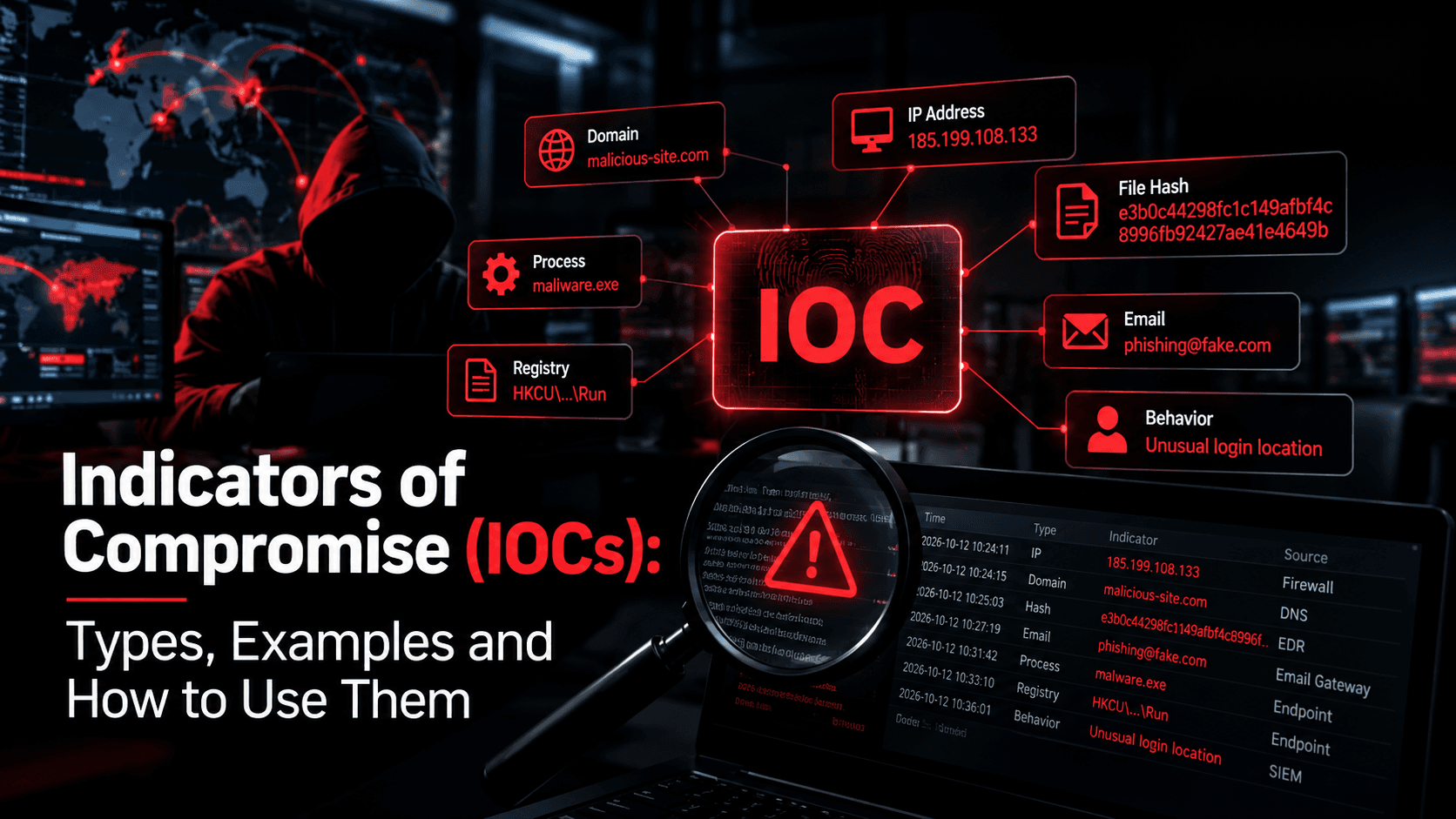
Indicators of compromise (IOCs) are the traces an attacker leaves behind, such as a file hash, a command-and-control domain, or an odd scheduled task. Matched against your logs and endpoints, they help you investigate whether an intrusion has happened and how far it may have spread. Many intrusions leave traces in logs nobody reviews. IOC work, backed by relevant threat intelligence, closes that gap.
What is an IOC in cybersecurity?
An indicator of compromise is evidence, such as a malicious hash or domain, that a system may have been breached.
What are the types of IOCs?
IOCs are usually grouped as network, host, file, email, or behavioral indicators, depending on where they are found.
What are the most common IOCs?
Frequently seen IOCs include malicious hashes, IPs and domains, unusual traffic, odd logins, new admin accounts, and scheduled tasks.
What is an example of an IOC?
In the 2020 SolarWinds attack, the backdoored Orion software contacted subdomains of avsvmcloud[.]com, a domain defenders could search for.
What is an IOC used for?
IOCs help teams detect known threats, investigate alerts, scope incidents, and search past logs for earlier activity.
Key Takeaways
- IOCs are evidence that a compromise may have happened, not proof on their own.
- Hashes and IPs are easy to change. Behaviors and techniques are harder.
- An IOC without context creates noise, not detection.
- IOCs work best alongside indicators of attack, which can catch behavior as it happens.
- You can only match IOCs against data you collect and keep.
- IOC lists need expiry dates and regular review.
What Are Indicators of Compromise (IOCs)?
Indicators of compromise are observable artifacts suggesting that an attacker has accessed or changed a system, account, or network. A beacon to a known command-and-control domain and a new admin account created at 3 a.m. both raise the same question: has someone already gotten in?
An IOC is usually a specific value you can search for in logs, block, or scan endpoints for. That also makes it fragile, since attackers can change many values easily. When a file is flagged, free malware analysis tools help confirm whether it's actually malicious. IOCs come from several places:
- Your own investigations: incident response findings.
- Threat intelligence: vendor reports, advisories, and feeds.
- Sharing groups: sector ISACs.
- Security tools: EDR, sandboxes, and email gateways.
Indicators are often shared as STIX over TAXII, or through platforms such as MISP.
Why Indicators of Compromise Matter
Attackers can stay unnoticed for days or weeks. According to Mandiant's M-Trends 2026, the global median dwell time rose to 14 days, up from 11 the year before. In 52% of its 2025 investigations, organizations detected the activity internally, up from 43% in 2024. IOCs help shorten that window in four ways:
- Detection: a match can surface an intrusion other alerts missed.
- Scoping: the same hash or C2 domain on other machines shows where else to look.
- Retrospective hunting: checking new advisories against stored logs.
- Verification: after cleanup, repeat IOC searches alongside broader forensic and behavioral checks. No matches alone can't confirm the attacker is gone.
SolarWinds shows why retrospective hunting matters. According to FireEye's original SUNBURST analysis, the backdoor waited through an initial dormant period of up to two weeks before retrieving and running commands. Once indicators were published, teams with stored DNS logs could check whether their Orion servers had reached avsvmcloud[.]com.
Types of Indicators of Compromise
1. Network-Based IOCs
Network-based IOCs include known bad IPs and domains, unusual DNS queries, uncommon ports, and beaconing at fixed intervals. Outbound internet traffic from servers that shouldn't need it, such as domain controllers, is a strong signal.
2. Host-Based IOCs
Host-based IOCs include new services or scheduled tasks, registry Run keys, new local admins, disabled security tools, and cleared logs. Many are persistence techniques that let an attacker survive a reboot.
3. File-Based IOCs
File-based IOCs identify malicious files through hashes, names, paths, sizes, and signing details. Hashes are precise but brittle: change one byte and the hash changes.
4. Email-Based IOCs
Email-based IOCs include lookalike sender domains, mismatched reply-to addresses, subject lines, attachment hashes, URLs, and failed SPF, DKIM, or DMARC checks. After an account takeover, a new forwarding or hiding rule is a useful sign.
5. Behavioral IOCs
Behavioral IOCs describe what an account or system did: impossible travel, admin activity at odd hours, internal network scanning, mass file renames, or large uploads to cloud storage. They can be harder to evade because they reflect goals, not tools.
Common Indicators of Compromise Examples
A single match is a lead, not proof.
Indicator | Example | What it may mean | Where to look |
|---|---|---|---|
Known malicious domain | DNS queries for an advisory-listed domain | Malware calling home | DNS, proxy, firewall logs |
Beaconing traffic | HTTPS requests to one host every 60 seconds | Command-and-control channel | Firewall, proxy, NetFlow |
Unusual outbound volume | Gigabytes uploaded to personal cloud storage | Data exfiltration | Proxy and DLP logs |
Brute force pattern | Many failed logons (Event ID 4625), then a success (4624) | Password guessing that may have worked | Windows Security and VPN logs |
Impossible travel | Sign-ins from New York and Singapore within 30 minutes | Stolen credentials or session token | Identity provider logs |
New privileged account | Account created (4720) and added to Domain Admins (4728) | Persistence or privilege escalation | Active Directory security logs |
New service or scheduled task | Service installed (7045) or task created (4698) | Persistence or remote execution | Windows logs, EDR |
Cleared logs | Security log cleared (Event ID 1102) | Attacker covering tracks | Windows Security log, SIEM |
Credential dumping | Unexpected process reading LSASS memory | Credential theft attempt | EDR, Sysmon |
Living off the land | certutil or PowerShell downloading a file | Built-in tools fetching malware | Event ID 4688 or Sysmon 1 |
Backup tampering | vssadmin deleting shadow copies | Possible ransomware preparation | EDR, process logs |
Mailbox forwarding rule | All mail forwarded externally | Possible business email compromise | Email platform audit logs |
Leaked credentials | Valid admin credentials on a dark web forum | Takeover risk, or already used | Dark web monitoring |
In one OraSec engagement, dark web monitoring found valid admin credentials for a healthcare provider's admin panel. Login logs showed no sign they had been used. The exposed credentials were an early warning of account takeover risk, not proof the panel had been breached, and acting quickly helped prevent unauthorized access.
Indicators of Compromise vs Indicators of Attack (IOAs)
Indicators of compromise are observable signs that malicious activity may be underway or that a compromise may have occurred. Indicators of attack focus on suspicious behavior that suggests an attack is being attempted. The two overlap, but IOCs often support investigations, while IOAs help detect attacker behavior. A known ransomware hash is an IOC. A process deleting shadow copies, then renaming thousands of files, is an IOA, and can work even against new ransomware.
Aspect | Indicators of Compromise (IOCs) | Indicators of Attack (IOAs) |
|---|---|---|
Question it answers | Has this system been compromised? | Is an attack happening now? |
Based on | Known artifacts: hashes, IPs, domains | Behavior and sequences of actions |
Timing | During or after a compromise; used in investigations and retrospective searches | Before or during the attack |
Detects new threats? | Only once indicators are identified and shared | Yes, if the behavior matches |
Ease of evasion | Often easy: recompile or move servers | Harder: the attacker's goal stays the same |
False positive rate | Low for good indicators, higher for stale ones | Can be higher without tuning |
Typical example | Connection to an advisory-listed domain | Office app spawning PowerShell |
Best used for | Blocking known threats, scoping, retrospective hunts | Unknown malware, hands-on-keyboard activity, insider abuse |
You need both: IOCs for known threats and retrospective searches, IOAs for what nobody has written an indicator for yet.
Related: Red Team vs Blue Team vs Purple Team
How to Identify Indicators of Compromise
1. Collect Security Logs and Telemetry
Collect identity, VPN, EDR, DNS, proxy, firewall, cloud, and email logs centrally. M-Trends 2026 warns that with threats like BRICKSTORM reaching dwell times of nearly 400 days, standard 90-day retention can leave teams blind to the initial access vector.
2. Monitor Network Traffic
Look for rare domains, regular beaconing, random-looking subdomains, and large uploads. Baseline first: what's odd for a domain controller may be routine for a developer laptop.
3. Analyze Endpoint Activity
Review process creation, services, scheduled tasks, registry, and account changes. Word launching PowerShell is far more telling than either process alone, and a host-based intrusion detection system helps track these changes.
4. Investigate Suspicious Files and Processes
Check the file's hash, signature, location, and creation time, and detonate unknown samples in a sandbox. For processes, check the command line, connections, and account.
5. Correlate Events Across Security Tools
Single events rarely prove a compromise. A phishing email, a click, a new process, and an unknown domain within five minutes tell a story no single tool shows. A SIEM with well-tuned alert triage makes that practical.
6. Validate Findings Against Threat Intelligence
Check indicators against vendor reports, CISA advisories, and your sector's ISAC. No match doesn't mean clean, since an indicator may be new or unique to you.
How to Use Indicators of Compromise in Threat Detection
1. Collect and Validate Threat Intelligence
Choose a few sources relevant to your sector. Filter out false positives, such as shared CDN and cloud addresses, before blocking anything.
2. Enrich IOCs With Context
Give each indicator a source, first and last seen dates, confidence, and related threat. Mapping it to MITRE ATT&CK shows the attack stage.
3. Integrate IOCs Into Security Tools
Push validated indicators to SIEM, EDR, firewalls, DNS filters, and mail gateways. High-confidence indicators can block. Lower-confidence ones should alert for review.
4. Investigate Matches and Prioritize Threats
Prioritize matches by asset and confidence: a domain controller outranks guest Wi-Fi. A threat hunting engagement uses hypothesis-driven investigation to find attackers the existing alerts missed.
5. Respond to Confirmed Compromises
Isolate hosts, reset credentials, end sessions, block indicators, and preserve evidence. Then sweep the environment, since attackers often move beyond the first machine.
6. Review and Update IOC Lists
Set expiry dates, especially for IPs and domains, and remove indicators that no longer produce useful matches. Add indicators from your own incidents.
Indicators of Compromise Checklist
Visibility
- Key logs collected centrally.
- Log retention long enough to investigate older intrusions.
- EDR on servers and workstations.
- Process creation logging includes command lines.
Intelligence
- Sources chosen for relevance to your sector and technology.
- Every indicator has a source, date, confidence, and related threat.
- Indicators checked for false positives before blocking.
- IPs and domains have expiry dates.
Detection
- Validated IOCs loaded into detection tools.
- Each indicator set to block or alert by confidence.
- Behavioral detections for credential dumping and lateral movement.
- New advisories trigger a retrospective log search.
Response
- Clear process for triaging IOC matches.
- Response plan covers isolation, resets, and evidence.
- IOCs from your own incidents fed back into detection tools.
- Detection tested through red team or purple team exercises.
Limitations of Indicators of Compromise
- They are mostly reactive. A new or targeted attack may have no published indicators yet.
- Many are easy to change. David Bianco's Pyramid of Pain puts hashes, IPs, and domains near the bottom, below tools and techniques. Any change to a file produces a completely different hash.
- Attackers tailor infrastructure. In the SolarWinds campaign, FireEye reported the attacker used dedicated infrastructure per intrusion in many cases.
- They go stale. Reassigned IPs cause false positives.
- They miss legitimate tool abuse. PowerShell, RDP, or stolen accounts may leave nothing to match.
M-Trends 2026 agrees that relying solely on static indicators is no longer sufficient. Pair IOCs with behavior-based detection rather than dropping them.
Also Read: Why Dark Web Monitoring Alone Is Not Enough
Common IOC Detection Mistakes
- Loading every free feed. Unvetted feeds cause alert fatigue.
- Blocking without checking. Blocking a shared CDN or cloud IP can break business applications.
- Never expiring indicators. Growing IP lists fill with addresses that belong to someone else.
- Matching only in real time. Without retrospective searches, older compromises stay hidden.
- Treating a match as the whole story. Blocking one C2 domain can leave other footholds in place.
- Ignoring low-severity malware alerts. M-Trends 2026 advises treating routine malware alerts as high-priority signs of an impending secondary intrusion.
- Relying on IOCs alone. Attacks using valid accounts and built-in tools can slip past.
Indicators of Compromise Best Practices
- Focus on quality over volume. A short, relevant list beats a large unvetted feed.
- Climb the Pyramid of Pain. Use hashes and IPs for quick wins, but focus on tools and behaviors.
- Keep context with every indicator. Source, dates, and confidence should travel with it.
- Retain logs long enough. Base retention on how long intrusions can go unnoticed.
- Search back when new indicators arrive. Make retrospective hunting routine.
- Feed your own incidents back in. They are often your most relevant indicators.
- Use standard formats. STIX and TAXII simplify sharing between tools and partners.
- Test your detection. Red and purple team exercises show what your tools and analysts actually catch.
How OraSec Can Help
OraSec helps teams find attackers their alerts missed. Our threat hunters use threat intelligence, IOCs, and attacker behavior across endpoints, networks, and cloud to answer one question: are we already compromised? Our AI ed team engagements show which attacker actions your SOC detects, which it misses, and where logging has gaps, and dark web monitoring can surface leaked credentials before attackers use them.
Conclusion
IOCs are evidence an attacker leaves behind, not proof on their own. Used well, they help you detect known threats, scope incidents, and find older intrusions. Keep them relevant, give them context, retire them as they age, and pair them with behavior-based detection. To check your environment for signs of compromise, talk to our team.
Frequently Asked Questions
How long do indicators of compromise stay useful?
It depends on the type. Malware hashes can stay useful for months or years, while IPs and domains often lose value within weeks.
Should we block every IOC from a threat feed?
No. Block only high-confidence indicators you have checked for false positives. Use lower-confidence ones as alerts so analysts can review them first.
What formats are used to share IOCs?
STIX structures threat intelligence, and TAXII exchanges it. MISP supports indicator sharing, while YARA and Sigma provide malware and log-detection rules.
What is the difference between IOCs and threat intelligence?
IOCs are one part of threat intelligence. Intelligence adds context: who the attacker is, what they target, and how they operate.
Can a small team use IOCs without a full SOC?
Yes. Many EDR, firewall, and email products include vendor threat intelligence. Collect the right logs first, then search them when relevant advisories appear.
Does a penetration test or red team exercise create IOCs?
Yes. Testers use real attacker techniques, so record their source IPs and tools to help analysts separate test activity from a real attack.